

In Part 1, we explored the concept of functional interfaces, where we used an interface with a single abstract method to pass logic around like a variable. We looked at a pure Aggregate function that summed or multiplied values, or returned the largest value in an array.
Those examples were "stateless", meaning that the operations depended only on the arguments passed to them (a and b in (a, b) => <expression>). In the real world, however, logic rarely exists in a vacuum. Functions often need context: thresholds, configuration values, or system parameters that aren't part of the function arguments themselves.
#include <iostream>

int main()
{
    int scale = 10;

    // Capture by value (copy)
    auto scaleByValue = [scale](int a, int b) { return (a + b) * scale; };

    // Capture by reference (observes changes)
    auto scaleByRef = [&scale](int a, int b) { return (a + b) * scale; };

    scale = 20;

    std::cout << scaleByValue(1, 2) << std::endl; // 30 (uses original scale = 10)
    std::cout << scaleByRef(1, 2) << std::endl;   // 60 (uses updated scale = 20)

    return 0;
}
The Challenge in Structured Text
- Function blocks with state - storing context as member variables
-
Fluent interfaces - chainable methods that configure and return the function block
The fluent interface approach is particularly elegant, as it allows us to configure operations inline, similar to how we'd use closures in modern languages.
Approach 1: Direct Configuration
{attribute 'no_explicit_call' := 'calling this function block directly is not allowed'}
FUNCTION_BLOCK FB_SumIfInRangeFunction IMPLEMENTS I_BiFunction
    VAR_INPUT
        nLowerThreshold,
        nUpperThreshold : INT;
    END_VAR

    METHOD Apply : INT
        VAR_INPUT
            nA, nB : INT;
        END_VAR

        // Only add nB if it's within the range
        IF nB >= nLowerThreshold AND nB <= nUpperThreshold THEN
            Apply := nA + nB;
        ELSE
            Apply := nA;
        END_IF
    END_METHOD
END_FUNCTION_BLOCK
Example Usage
PROGRAM P_Example2_Direct
VAR
    arNumbers       : ARRAY[0..4] OF INT := [15, 8, 23, 12, 19];
    fbSum           : FB_SumIfInRangeFunction;
    nFilteredSum    : INT;
END_VAR

// Configure the thresholds
fbSum.nLowerThreshold := 10;
fbSum.nUpperThreshold := 20;

// Apply operation
nFilteredSum := P_Operations.Aggregate(arNumbers, fbSum);
// Result: 15 + 12 + 19 = 46 (8 and 23 are excluded)
Approach 2: Fluent Interface (Method Chaining)
A fluent interface allows us to chain method calls together, configuring the function block inline. The key is that configuration methods return a reference to the function block itself (THIS^), enabling multiple calls to be chained together.
INTERFACE I_GreaterThanCondition
    METHOD AnyGreaterThan : I_BiFunction
        VAR_INPUT
            nThreshold : INT;
        END_VAR
    END_METHOD
END_INTERFACE
INTERFACE I_LessThanCondition
    METHOD AnyLessThan : I_BiFunction
        VAR_INPUT
            nThreshold : INT;
        END_VAR
    END_METHOD
END_INTERFACE
INTERFACE I_InRangeCondition
    METHOD AnyInBetween : I_BiFunction
        VAR_INPUT
            nLowerThreshold, nUpperThreshold : INT;
        END_VAR
    END_METHOD
END_INTERFACE
{attribute 'no_explicit_call' := 'calling this function block directly is not allowed'}
FUNCTION_BLOCK FB_SumFunction
IMPLEMENTS I_BiFunction, I_GreaterThanCondition, I_LessThanCondition, I_InRangeCondition
    VAR_STAT CONSTANT
        _nMIN_INT : INT := -32768;
        _nMAX_INT : INT := 32767;
    END_VAR
    VAR
        _nLowerThreshold : INT := _nMIN_INT;
        _nUpperThreshold : INT := _nMAX_INT;;
    END_VAR

    // Sets the minimum threshold (inclusive)
    // Values must be GREATER THAN OR EQUAL to this threshold
    METHOD AnyGreaterThan : I_BiFunction
        VAR_INPUT
            nThreshold : INT;
        END_VAR
        AnyGreaterThan   := THIS^;

        _nLowerThreshold := nThreshold;
        _nUpperThreshold := _nMAX_INT;
    END_METHOD

    // Sets the maximum threshold (inclusive)
    // Values must be LESS THAN OR EQUAL to this threshold
    METHOD AnyLessThan : I_BiFunction
        VAR_INPUT
            nThreshold : INT;
        END_VAR
        AnyLessThan      := THIS^;

        _nLowerThreshold := _nMIN_INT;
        _nUpperThreshold := nThreshold;
    END_METHOD

    // Sets the lower and upper threshold (inclusive)
    // Values must be BETWEEN these thresholds
    METHOD AnyInBetween : I_BiFunction
        VAR_INPUT
            nLowerThreshold, nUpperThreshold : INT;
        END_VAR
        AnyInBetween     := THIS^;

        _nLowerThreshold := nLowerThreshold;
        _nUpperThreshold := nUpperThreshold;
    END_METHOD

    // Resets the configuration so that all values are allowed
    METHOD Everything : I_BiFunction
        VAR_INPUT
        END_VAR
        Everything := THIS^;

        _nLowerThreshold := _nMIN_INT;
        _nUpperThreshold := _nMAX_INT;
    END_METHOD

    METHOD Apply : INT
        VAR_INPUT
            nA, nB : INT;
        END_VAR
        // Only add nB if it's within the configured range
        IF nB >= _nLowerThreshold AND nB <= _nUpperThreshold THEN
            Apply := nA + nB;
        ELSE
            Apply := nA;
        END_IF
    END_METHOD
END_FUNCTION_BLOCK
Example Usage
ROGRAM P_Example2_Fluent
VAR
    arNumbers        : ARRAY[0..4] OF INT := [15, 8, 23, 12, 19];
    fbSum            : FB_SumFunction;
    nFilteredSum1,
    nFilteredSum2,
    nFilteredSum3    : INT;
END_VAR

// Configure and apply operations inline
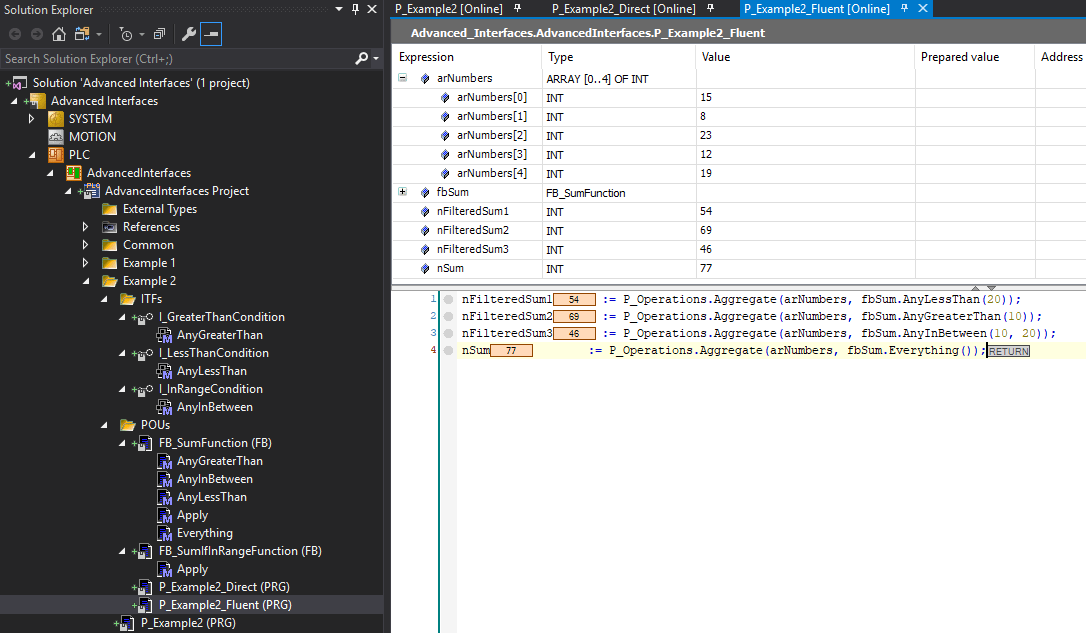
nFilteredSum1 := P_Operations.Aggregate(arNumbers, fbSum.AnyLessThan(20));
// Result: 15 + 8 + 12 + 19 = 54 (23 is excluded)

nFilteredSum2 := P_Operations.Aggregate(arNumbers, fbSum.AnyGreaterThan(10));
// Result: 15 + 23 + 12 + 19 = 69 (8 is excluded)

nFilteredSum3 := P_Operations.Aggregate(arNumbers, fbSum.AnyInBetween(10, 20));
// Result: 15 + 12 + 19 = 46 (8 and 23 are excluded)

nSum          := P_Operations.Aggregate(arNumbers, fbSum.Everything());
// Result: 15 + 8 + 23 + 12 + 19 = 77 (all values are included)
Benefits of the Fluent Approach
- Readability: Configuration reads like natural language
- Type Safety: Each interface clearly defines what operations are available
- Inline Configuration: No need for separate setup steps
- Discoverability: Separate interfaces guide developers through available options
- Immutability Simulation: Each call appears to create a configured version without mutating the original (though technically it does modify the instance)
- Composability: Easy to build complex behaviors from simple building blocks
Real World Applications
Data Transformation & Mapping
// Transform raw ADC values to engineering units with calibration offset
fCalibratedTemps := P_DataTransform.Map(
    nRawSensorData,
    fbADCToTemp.WithOffset(nZeroOffset).WithGain(fCalibrationGain)
);
Filtering & Selection
// Select production batches exceeding quality threshold
nCount := P_DataFilter.Filter(
    arAllBatches,
    fbQualityCheck
        .AnyGreaterThan(nPremiumThreshold)
        .WithMargin(fSafetyMargin),
    arPremiumBatches
);

// Find active alarms above critical severity
nCount := P_DataFilter.Filter(
    arAlarmList,
    fbAlarmFilter
        .AnyGreaterThan(E_Severity.High)
        .IsActive()
        .NotAcknowledged(),
    arCriticalAlarms
);
Validation & Predicates
// Verify all safety sensors are within safe range
bSystemSafe := P_SafetyCheck.Every(
    arSafetySensors,
    fbSafetyValidator
        .AnyInBetween(nSafeMin, nSafeMax)
        .WithHysteresis(nHysteresisBand)
);
Sorting & Ranking
// Sort machines by efficiency, excluding standby units
P_EquipmentSort.Sort(
    arMachines,
    fbEfficiencyCompare.AnyGreaterThan(nMinEfficiency).ByDescending()
);

// Rank production runs by yield within quality band
P_BatchSort.Sort(
    arProductionRuns,
    fbYieldCompare.AnyInBetween(nMinQuality, nMaxQuality).ByYield()
);
Search & Analysis
// Find first sensor reading exceeding alarm threshold
ipFirstAlarm := P_DataSearch.Find(
    arSensorReadings,
    fbThresholdCheck.AnyGreaterThan(nAlarmThreshold).Confirmed(T#2s)
);

// Identify optimal batch by cost-to-quality ratio
ipBestBatch := P_BatchAnalysis.FindOptimal(
    arBatches,
    fbCostAnalysis.AnyGreaterThan(nMinYield).WithQualityWeight(0.6)
);
Statistical Aggregation
// Calculate weighted average excluding statistical outliers
fWeightedAvg := P_Statistics.Aggregate(
    arMeasurements,
    fbWeightedAvg
        .AnyInBetween(fMean - 3*fStdDev, fMean + 3*fStdDev)
        .WithWeights(arWeights)
);

// Compute RMS vibration in bearing frequency range
fBearingVibration := P_VibrationAnalysis.Aggregate(
    arFFTData,
    fbRMS
        .AnyInBetween(fBearingFreqLow, fBearingFreqHigh)
        .WithHanningWindow()
);
Conclusion
- Storing context as member variables within function blocks
- Exposing configuration through dedicated interfaces for type safety and discoverability
- Returning references to the functional interface (THIS^) to enable inline configuration
- Inline configuration that mimics closure capturing
- Type-safe composition through interface segregation
- Natural, readable syntax that expresses intent clearly
- Flexible, reusable components that adapt to different contexts